


Airthings
4.4475.00 Reviews
App Specs
- Version
- 8.1.4
- Updated On
- License
- Free
- Downloads
- 100,000+
- Developer
- Airthings ASA
- Categories
- House & Home
- Platform
- Android
Screenshots
 Analysis by AppCompare
I found Airthings most useful as a companion to Airthings hardware rather than as a general-purpose home comfort app. Its purpose is straightforward: bring information from your Airthings devices into one place so I can keep an eye on indoor conditions without checking separate equipment manually. That focused role is also the key to deciding whether it belongs on your phone. If you already use Airthings monitors, it is a sensible part of that setup; if you do not own compatible Airthings equipment, the app alone has little reason to stay installed.
Developed by Airthings ASA, this free House & Home app is available for Everyone and supports devices running Android 12 or later. It has built a solid audience, with a 4.4 average from around 6,200 ratings and more than 100,000 installs. I would not treat those figures as a substitute for personal testing, but they do suggest that the app is established enough to be taken seriously by people managing indoor air information at home.
What using Airthings is actually like
The first thing I noticed is that the experience depends heavily on the relationship between the phone app and the physical monitor. This is not an app that creates useful readings from the phone itself. Instead, it acts as the viewing and management layer for Airthings devices. That distinction matters because some people search for a home app expecting a quick room scan or a software-only estimate. Airthings is better understood as a dashboard for a dedicated monitoring system.
When the setup is working, the benefit is convenience. I can open one app rather than walk around checking individual hardware displays, and I can use the information as part of ordinary household decisions. The value is not in opening it once, admiring a graph, and forgetting it. The value comes from noticing patterns: whether a room changes after cooking, whether ventilation makes a difference, or whether a bedroom feels different overnight from the rest of the home.
That makes the app more practical than the short store description might suggest. It is not simply a remote control in the narrow sense. It gives the readings from the Airthings ecosystem a place where they can be interpreted over time. For indoor air monitoring, that historical perspective is often more useful than a single number seen at a single moment.
Why the dashboard matters more than a one-time reading
A single reading can be interesting, but it rarely tells me what action to take. A sequence of readings is more revealing. If I open the app after a room has been occupied for several hours, then compare that situation with the same room after airing it, I have a better basis for judging whether my routine is helping. The app becomes useful when I treat it as a record of the home rather than an alarm clock for every small change.
My preferred approach is to check at consistent moments instead of constantly refreshing. For example, I might look in the morning, after preparing a meal, and before going to bed. This keeps the information connected to real habits. It also prevents the common mistake of reacting to every temporary fluctuation as if it were a permanent household problem.
Worth Reading Before You Choose

EA SPORTS FC Mobile 26 Is a Bigger Football Game, but It Takes Time

Flipboard Shows What News Apps Must Do Beyond the Feed

Switching to Android Auto Means Rethinking Your Driving Routine

Google Calendar Makes a Crowded Week Easier to Manage

Ludo King Makes the Most of the Minutes Between Plans

Baby Panda World Brings Quick Play to Modern Phones, but Its Game Library Feels Busy
A more advanced but very approachable workflow is to keep short notes alongside the readings. I can remember that windows were open, that several people were in the room, or that cleaning took place. Those details help explain changes that might otherwise seem mysterious. The app supplies the monitoring view, while the user supplies the context. That combination is more valuable than relying on either one alone.
A realistic everyday scenario
Imagine a small home office used by one person throughout the day. In the morning, the room seems comfortable, but by mid-afternoon it feels stale. Rather than guessing whether the problem is temperature, air movement, or simply a closed room, I can check the Airthings app and compare the office at different times. I can then open a window or change the ventilation routine and look again later.
The important point is not that the app automatically solves the room. It helps turn a vague feeling into a repeatable observation. After several days, I may discover that the room changes mainly after long meetings, or that the issue appears only when the door stays closed. That kind of pattern can lead to a practical adjustment instead of buying another appliance immediately.
The same approach works in a bedroom. I might check the room before sleep and again in the morning, then compare those observations with nights when the door or window was handled differently. Families can use the app in a similar way when deciding where a monitor is most useful. A device placed in the living room may tell a different story from one in a bedroom, so the app is most helpful when I interpret each location in its household context rather than treating the home as one uniform space.
Where Airthings feels stronger than usual alternatives
The usual alternative is to depend on occasional manual checks, a basic standalone display, or a broad smart-home dashboard that mixes many unrelated devices. Those options can be fine for a quick glance, but they often make indoor monitoring feel disconnected from daily routines. Airthings has a clearer purpose because the app is built around Airthings devices and their readings.
I also prefer this focused approach to an app that tries to become a complete home-control center. A crowded dashboard can be powerful, but it can also bury the information I actually want. Airthings keeps the attention on indoor monitoring, which makes it easier to build a regular checking habit. The trade-off is obvious: people who want lighting, heating, security, and air information in one universal interface may prefer a broader smart-home platform.
Another advantage is the potential for continuity. A physical monitor can remain in a room while the phone becomes the place where I review what happened. That is more useful than carrying a device from room to room simply to see a current reading. Still, the quality of that experience depends on the Airthings hardware and the connection between it and the app, so the software should not be judged as if it were independent.
The friction I would not ignore
The biggest limitation is also the most important expectation to set: Airthings is not a standalone solution. Without compatible Airthings devices, the app cannot offer the same value. Someone looking for a free app that turns a phone into a complete indoor air monitor is likely to be disappointed. The free download does not remove the need for the wider hardware setup.
There is also a mental adjustment involved. Indoor readings can encourage overchecking, especially for users who are already anxious about household conditions. If I open the app repeatedly and interpret every movement as a crisis, the technology becomes stressful rather than helpful. I think the better method is to establish a simple routine, make one change at a time, and judge patterns over several observations.
Another weakness is that the app cannot provide the whole answer by itself. A reading may show that something changed, but it does not automatically explain whether the cause was cooking, occupancy, weather, ventilation, or the position of the monitor. Users who expect a single tap to diagnose a home will find the experience less decisive than they hoped. The app is strongest as an evidence-gathering tool, not as a replacement for judgement or professional advice when a serious concern exists.
Version 8.1.4 is the current version, and the minimum operating-system requirement of Android 12 means owners of older phones may need to check compatibility before planning around it. That is a practical consideration rather than a criticism of the interface, but it can affect households that keep an older phone as a permanent home dashboard. I would check the phone used for monitoring first, especially if it is an older spare device.
Small habits that make the app more useful
My first tip is to choose the monitor location deliberately. A device placed directly beside a window, cooker, heater, or frequently opened door may reflect that immediate spot rather than the room as a whole. The app can display the resulting information, but it cannot correct a misleading placement. I would begin with the room where a decision is most likely to be made, then leave the device there long enough to observe normal use.
Second, I would avoid changing several household routines at once. If I open windows, move the monitor, run ventilation, and change cleaning products on the same day, I will not know which action mattered. Airthings becomes more informative when I use it like a simple home experiment: observe, make one reasonable adjustment, and observe again.
Third, I would use the app to challenge assumptions. A room that feels stuffy may not have the cause I expect, while a room that feels fine may still show a pattern worth investigating. This is one of the less obvious strengths of a monitoring dashboard: it can stop me from spending money on the wrong fix. Before purchasing another fan, purifier, or ventilation accessory, I can first ask what the existing information actually suggests.
Fourth, I would share the routine with other people in the home. Monitoring only works if everyone understands what the information is for. If one person checks the app but nobody changes the relevant habit, the dashboard becomes a passive display. A short agreement, such as checking after cooking or airing a bedroom at a set time, makes the readings more actionable without turning the home into a laboratory.
Who should install it
I would recommend Airthings to people who already own Airthings monitors and want a clearer way to follow their indoor environment. It is especially suitable for users who enjoy looking at patterns, adjusting household routines, and making decisions based on observations rather than impressions. It can also suit a family that wants one shared place to review information from devices located in different rooms.
It is a good fit for a careful homeowner who wants to understand how everyday activities affect indoor conditions. The app can support a gradual process: establish a baseline, notice unusual changes, test a practical response, and decide whether the response helped. That is more realistic than expecting instant perfection from an indoor monitoring setup.
I would be more cautious about recommending it to someone who wants a universal home app. If your priority is controlling lights, thermostats, cameras, speakers, and sensors from one ecosystem, a broader platform may be a better center of gravity. Airthings is focused, and that focus is either its main strength or its main drawback depending on what you already use at home.
I would also suggest skipping it if you do not plan to use Airthings hardware. The app may be free and rated for Everyone, but those facts do not make it useful in isolation. In that situation, a phone app connected to equipment you already own, or a standalone monitor with its own display, may be a more sensible choice.
My final assessment
After using Airthings as a companion to indoor monitoring, I see it as a focused and practical app rather than a complete smart-home command center. Its best quality is that it encourages me to look at indoor conditions over time and connect them with real household habits. The strongest results come when I use the information calmly, keep the monitor in a sensible location, and treat changes as clues rather than instant diagnoses.
The limitations are clear: its usefulness depends on Airthings devices, it requires a compatible phone running Android 12 or later, and it cannot explain every change without user context. Those are meaningful trade-offs, but they are not deal-breakers for the intended audience. The app is free, currently at version 8.1.4, and comes from Airthings ASA, so existing owners have a straightforward way to bring their device information together.
My recommendation is simple: choose Airthings if you want a dedicated window into your Airthings setup, not if you are searching for a phone-only air monitor or an all-in-one smart-home controller. For the right household, it turns scattered observations into a manageable routine. For everyone else, its narrow purpose may feel like a limitation from the first launch.
Pros
- Easy-to-read air quality data with clear health recommendations.
- Supports multiple Airthings monitors in one convenient dashboard.
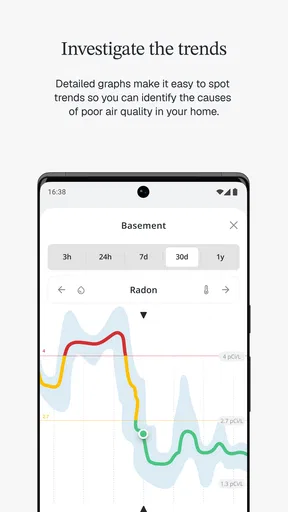
- Historical graphs help identify pollution and ventilation patterns.
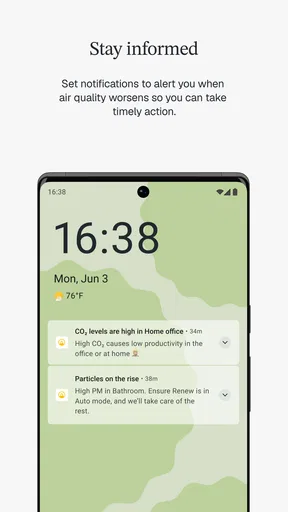
- Useful alerts can warn you when air quality changes significantly.
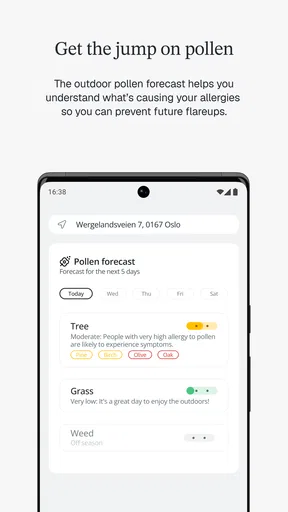
- Works well for tracking indoor air alongside outdoor conditions.
Cons
- Many useful features require compatible Airthings hardware.
- Some readings may take time to update depending on the monitor.
- Initial device pairing can be confusing for first-time users.
- Battery-powered sensors may need occasional battery replacement.
- The app may feel excessive if you only need basic air-quality readings.
FAQs for Airthings
What is Airthings, and what does the app do?
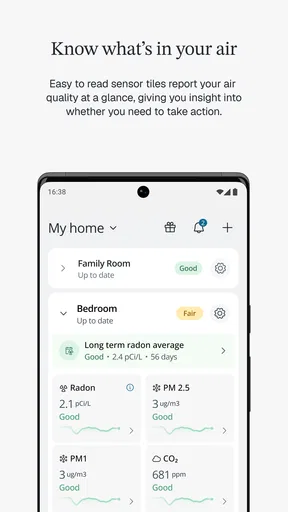
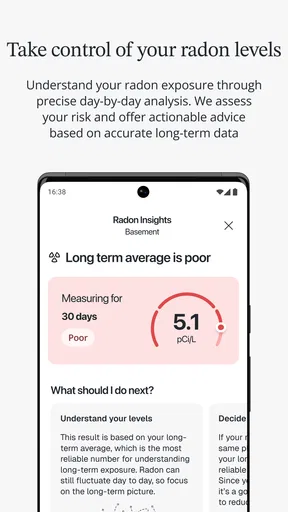
Airthings is a companion app for Airthings’ indoor air-quality monitors. After connecting a compatible device, the app displays readings such as radon, carbon dioxide, particulate matter, humidity, temperature, pressure, and volatile organic compounds, depending on the model. It also presents trends, notifications, and practical guidance to help users understand and improve the air in their home or workplace.
Do I need an Airthings monitor to use the Airthings app?
Yes, the app is primarily designed to work with Airthings hardware, so its main monitoring features require a compatible Airthings device. The exact measurements and connection method depend on the product you own. Before downloading, check the app’s compatibility list and confirm that your monitor supports your phone, operating-system version, and preferred connection method, such as Bluetooth or Wi-Fi.
How accurate are the measurements shown in Airthings?
Airthings devices are intended for home and workplace awareness rather than laboratory certification. Readings can be affected by placement, ventilation, temperature, humidity, calibration, and normal sensor variation. During testing, the app was most useful for identifying patterns and changes over time rather than treating one reading as an absolute diagnosis. Users should follow the device instructions and consult qualified professionals when serious concerns arise.
Does Airthings send alerts when air quality becomes unhealthy?
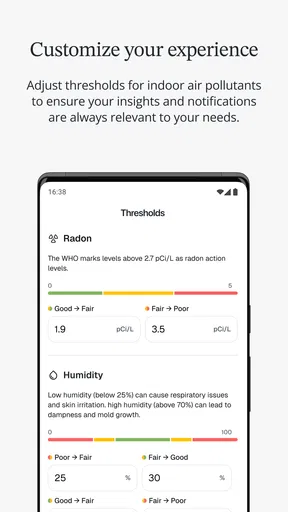
The app can provide notifications and status information for supported measurements when readings reach configured or recommended levels, although the available alerts vary by device and account settings. Users may need to enable notifications in both the Airthings app and their phone’s system settings. Alerts should be treated as an early warning, not an emergency service or medical assessment, especially when radon or other pollutants are involved.
Is the Airthings app free, and does it require an account?
The Airthings app is generally available to download without a separate purchase, but its useful monitoring functions depend on owning compatible Airthings hardware. Some features, such as cloud access, data history, sharing, or advanced services, can vary by product and subscription arrangement. An account may be required for certain features, so review the current terms, privacy information, and pricing shown in the official app store before purchasing a monitor.


